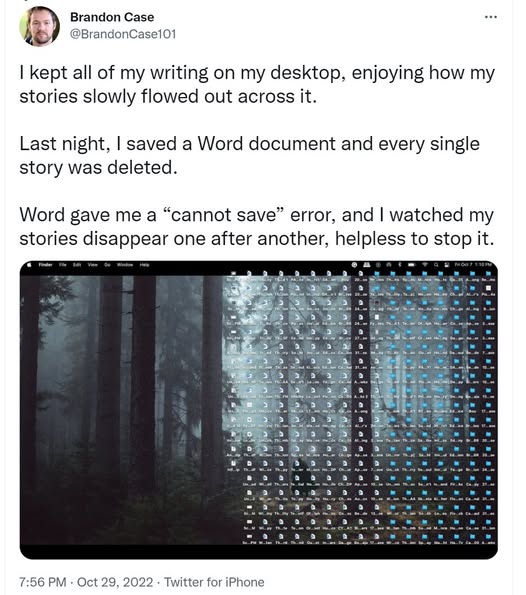
Friends, back up your stuff!
This is my semi-regular PSA to make sure you’re backing up all that data you would be miserable if you lost. After several hard drive failures in succession in the early 2010s, I put together a triple redundant backup system that I use to this day to make sure I don’t lose irreplaceable things — not just family photos and videos but all the stuff for my writing business, including the dozens of novels and short stories that are the core of it all.
I do not trust any given piece of software or online system or mirroring, etc, especially when it is “free” (although I understand why people use those)—my trust is in a multiply-redundant system that, when one of those systems inevitably fails, the others will hold it up. Failures aren’t just hard-drives going belly up but potentially getting hacked or locked out of all your accounts or any number of other failure modes that you won’t appreciate until they happen to you.
Here’s what my backup system looks like.
#1 – PRIMARY DESKTOP COMPUTER: an organized file structure on my main computer is the base where I keep all my files. Not only does it have the most-current documents, it has drafts and is organized in a way so I can find things. This primary computer gets backed up multiple ways. If I want to make sure something is secure, I put a copy of it here.
#2 – EXTERNAL BACKUP DRIVE: I schedule (via Acronis software) daily backups of my primary desktop to a 2 TB external drive. This drive sits physically right next to my computer. It’s a very recent backup (within the last 24 hours) but also keeps versions across the prior 2 weeks. If I accidentally delete a file or it gets corrupted on #1, then I have it on #2. But if I have a housefire, both #1 and #2 are gone.
#3 – CLOUD SERVICE BACKUP: I use BackBlaze, a cloud-based secure backup service that I pay for, to “continuously” back up my desktop to the cloud. In practice, it’s slowly making copies to the cloud as time/bandwidth is available which means it’s “current” for small file changes instantly and within 24+ hours for a large change (like copying over big files). If the housefire wipes out #1 and #2, then #3 can restore all my primary desktop files. It’s also easily accessible for any inadvertently deleted files.
#4 — PORTABLE BACKUP DRIVE: I have one final backup — once a year, I back up all my taxes and IP and images/video on some flashdrives that I have in my go-bag, which contains lots of important documents which aren’t digital (like birth certificates). If there were some catastrophic failure of all the digital backups, this once-a-year backup would have the basic stuff, plus it’s portable to grab in an emergency. This year, I’m upgrading from flashdrives to a solid state portable USB drive just because the tech makes that small enough to go in the go-bag now and it’s faster to make the backup itself. It’s the ultimate backup to the backups, never more than a year out of date.
Then there’s the ultimate backup for authors: the fact that you’ve published. If nothing else, it’s possible to resurrect books that are scattered to the digital winds or that have a hardcopy on your shelf.
Is this overkill? Is it sufficient to simply email something to yourself or copy it to OneDrive or rely on GoogleDocs to do your versioning/backups for you? All depends on your risk tolerance, I guess.
But I haven’t lost a document since I set up this system and when it comes time for my heirs to inherit my literary estate, my Final Letter* tells them how to find all the IP. Who knows what the situation will be when that occurs—perhaps the housefire is what took me out!—so this is insurance for them as well.
In this age of technology enshittification, I don’t trust any tech for anything right now and certainly not in the future. Save your future self the heartache of finding out the hard way that tech will fail you right when you need it most.
*this is also the time of year that I update my Final Letter, a document to my heirs that tells them where all the stuff is and how to handle my literary estate. Highly recommend. I should probably do a separate post on that.